Présentation de la nouvelle page Réunions
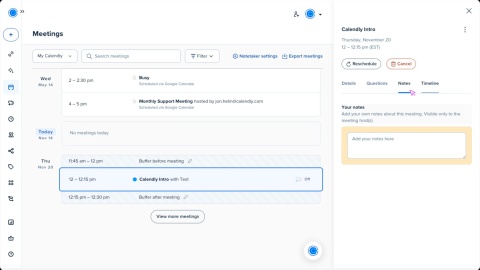

La nouvelle page Réunions rassemble tous les détails de vos réunions Calendly en une seule vue simple. Tout ce dont vous avez besoin pour préparer, rejoindre et faire le suivi des réunions se trouve au même endroit.
Quoi de neuf sur la page Réunions
Voici ce qui est nouveau et amélioré :
- Vue simplifiée des réunions Consultez vos réunions à venir et passées sur la même page. Faites défiler pour voir ce qui arrive ou revoir ce qui s'est déjà passé sans changer d'onglet.
- Détails des réunions plus clairs Cliquez sur une réunion pour trouver rapidement les informations dont vous avez besoin. Les participants, l'emplacement, les questions des invités et les notes internes sont tous organisés dans un seul panneau.
- Toutes vos réunions au même endroit Avez-vous connecté votre Google Agenda ou votre calendrier Outlook ? Vous verrez désormais ces événements aux côtés de vos réunions Calendly pour une vue complète de votre planning.
Afficher les réunions depuis votre calendrier connecté
Lorsque vous connectez votre Google Agenda ou votre calendrier Outlook, vous verrez ces réunions avec vos événements Calendly sur la page Réunions. Cela vous aide à suivre toutes vos réunions au même endroit.
En savoir plus sur l'affichage des réunions Google ou Outlook dans Calendly.
Gérer vos réunions
Depuis la page Réunions, vous pouvez consulter les détails, effectuer des mises à jour ou agir sur toute réunion programmée via Calendly.
Les réunions de votre Google Agenda ou de votre calendrier Outlook apparaissent également ici, mais elles sont en lecture seule. Vous pouvez choisir de les afficher ou non sur votre page Réunions. Découvrez comment afficher les réunions Google ou Outlook dans Calendly.
Sélectionnez une réunion pour ouvrir plus d'informations sur le côté droit de la page. À partir de là, vous pouvez :
- Consulter les détails de la réunion, comme l'emplacement et l'organisateur
- Modifier les coordonnées de l'invité et consulter ses réponses aux questions
- Ajouter des notes internes à la réunion
- Vérifier la chronologie des actions et des notifications liées à la réunion
Pour agir sur une réunion, vous pouvez :
- Annuler ou reprogrammer une réunion à venir
- Réserver une réunion de suivi
- Marquer un invité comme absent pour une réunion passée
Pour des instructions étape par étape, en savoir plus dans Comment gérer vos réunions.